Settings
Overview
Color-Chan is customizable to fit the needs of your server. This guide will cover some of the miscellaneous settings that can be configured in Color-Chan. This section does not cover permission settings, which can be found here.
Accent colors
You can set your server's accent color using the /accent color command. This color will be used in various places in Color-Chan, such as in color list embeds.
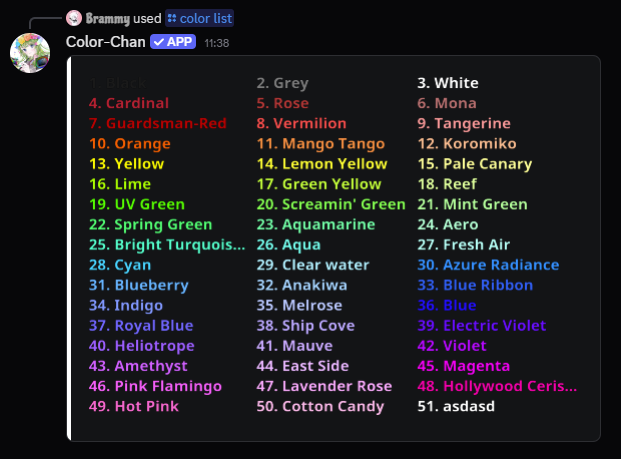
A color list with the #FFFFFF accent color
To reset the accent color to the default, you can use the /accent color command without providing a color.
Auto delete responses
You can enable or disable the auto delete feature for Color-Chan's responses using the /toggle delete responses command. When enabled, Color-Chan will automatically delete its responses after a certain period of time.
Disabling the export feature
You can choose to disable the export feature in Color-Chan using the /toggle export command command. When disabled, members will not be able to export your color lists.
Auto assign colors to new members
You can enable or disable the auto assign colors to new members feature using the /toggle join color command.
When enabled, Color-Chan will automatically assign a color to new members when they join your server.
This command has two options: color and after-role.
- The
coloroption will assign a specific color from your color list to new members instead of a random color. - The
after-roleoption will assign the color role directly after the specified role in the role hierarchy. This is useful if you don't want to give a color to new members who have not performed certain actions (like verifying).
Replies to reaction messages
You can choose whether Color-Chan should reply to users in reaction color messages using the /toggle reaction messages command.
When enabled, Color-Chan will reply to users when they assign or remove a color role using reaction color messages.
Overlap warning
You can enable or disable the overlap warning using the /toggle overlap warning command.
When enabled, Color-Chan will warn you when there are roles in your server that will prevent color roles from being displayed correctly due to Discord's role hierarchy system.