Deleting colors
Caution
Be careful when using the delete or clear commands, as they will permanently remove colors from your color list. Make sure to double-check before confirming any deletions.
Deleting a single color
You can delete specific colors from your color list using the /delete color command. This will also delete the color roles from any reaction lists they were part of.

Example output of the /delete color command
Clearing the color list
It is also possible to clear your entire color list with the /clear color list command.
This will remove all colors from your color list, including any reaction color lists that you may have created.
First, you will get a confirmation prompt to ensure that you want to proceed with this action.
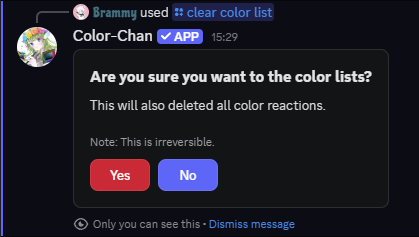
Example confirmation prompt of the /clear color list command
Once confirmed, all colors will be deleted from your color list.

Example output of the /clear color list command